
Sep 4, 2026
How to Verify Email Addresses Before Outreach (3 Methods)
Verify email addresses before outreach using syntax checks, MX records, and SMTP verification. Avoid bounce rates that hurt sender reputation and deliverability.
 Rena Sato 佐藤玲奈784 words4 min read
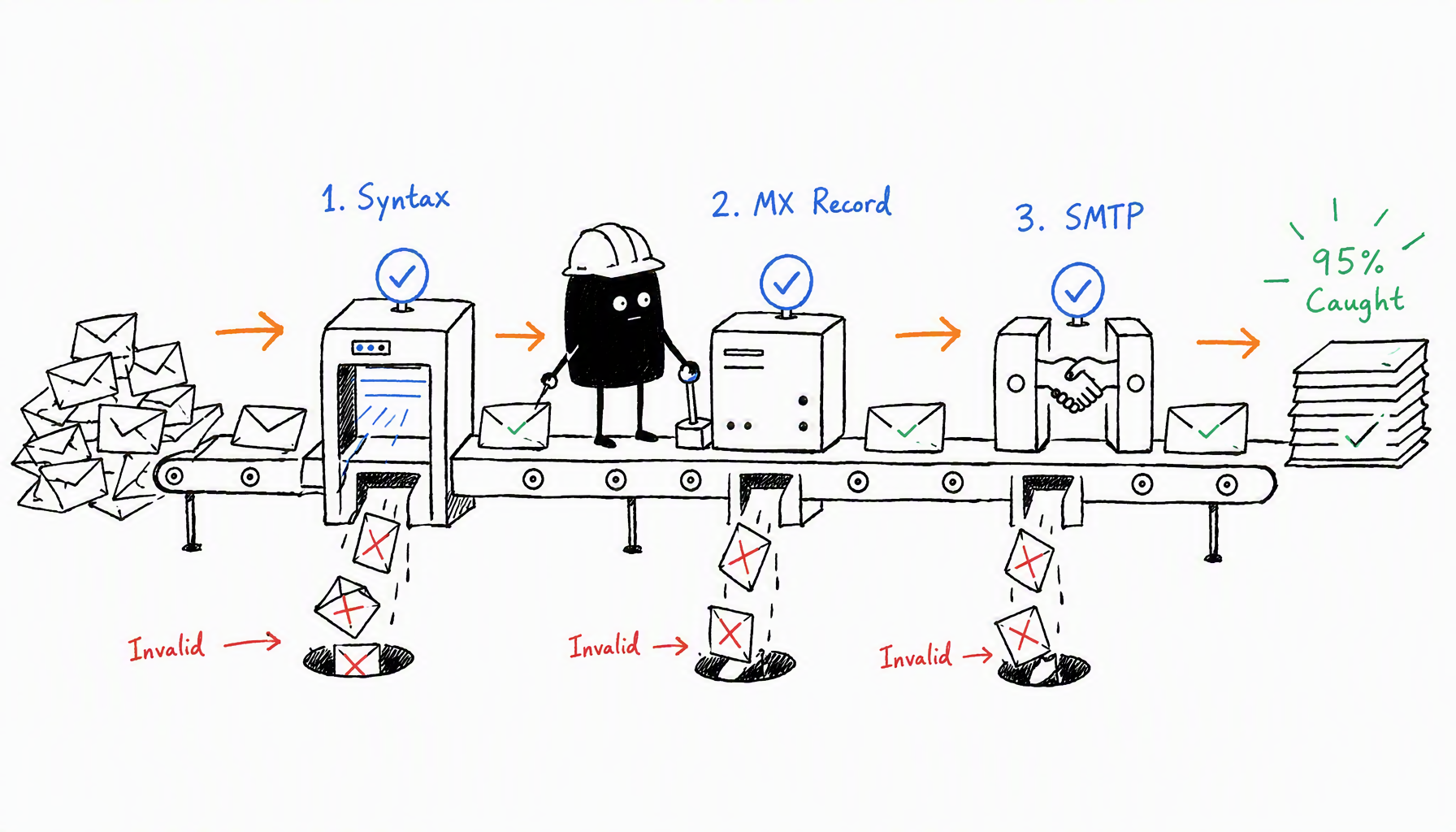
Run a syntax check, verify the domain has a mail server, then test SMTP delivery. Those three steps catch 95% of invalid addresses before they bounce.
You just spent two hours finding 50 creator emails. You send your first outreach batch, and 12 bounce. Your email provider flags your domain. The next 200 emails land in spam. That's the cost of skipping verification.
Here's how to verify email addresses before outreach — three methods that take minutes and protect your sender reputation.
Key Takeaways
• Bounce rates above 5% trigger spam filters; above 10% gets your domain blacklisted
• Syntax checks catch typos instantly but can't confirm the mailbox exists
• SMTP verification is 98% accurate but requires professional tools to avoid getting flagged
Why Email Verification Matters (The 5% Rule)
Every bounced email hurts your sender reputation. Email providers track your bounce rate, and the thresholds are strict: above 5% puts you on watch, above 10% gets you blacklisted.
When Marcus ran his first influencer campaign in August, he skipped verification. Out of 200 emails, 35 bounced (17.5%). Gmail flagged his domain within 48 hours. For the next three weeks, every email he sent landed in spam — even to people who'd responded before. He lost a $15,000 partnership because his follow-up never reached the client.
Verification costs $0.008 per email. Domain reputation repair costs $2,000+ and takes months.
Want to find creator emails at scale? Start with a clean list.
Method 1: Syntax Check (Start Here, Takes 5 Seconds)
A syntax check verifies email format: one @ symbol, valid characters, real domain extension. It catches typos like `gmail.co` instead of `gmail.com` or missing @ symbols.
How to do it: Most email tools include automatic syntax filtering. CreatiVault's Influencer Scout runs syntax checks when extracting emails, flagging obvious errors before they hit your outreach list.
Limitation: Syntax validation only confirms the format is correct. It doesn't tell you if `johndoe@example.com` actually exists.
Method 2: MX Record Check (Confirms Mail Server Exists)
An MX (Mail Exchange) record check verifies the domain has a mail server configured. If the domain doesn't accept email, every address at that domain will bounce.
How it works: Your verification tool queries the domain's DNS records to see if it's set up to receive mail. No MX record = guaranteed bounce.
Free tool: Use MXToolbox.com or run `nslookup -type=mx domain.com` in your terminal.
What it catches: Typo domains (`gmial.com`), expired domains, domains not configured for email.
Limitation: An MX record confirms the domain accepts mail. It doesn't confirm `johndoe@example.com` is a real mailbox.
Method 3: SMTP Verification (Most Accurate)
SMTP verification connects to the recipient's mail server and simulates sending an email without actually delivering it. The server responds with "valid" or "invalid."
Accuracy: 98% — the most reliable method short of sending a real email.
The catch: Frequent SMTP checks from the same IP get flagged as spam. That's why you need a professional verification API with whitelisted IPs.
Recommended tools:
- ZeroBounce: $16 per 2,000 verifications
- NeverBounce: $0.008 per email (pay-as-you-go)
- Hunter.io: $49/month for 1,000 verifications
For agencies sending 500+ outreach emails weekly, the cost is $4/week to protect a domain worth thousands. Compare email finder tools that include built-in verification.
Understanding Verification Results
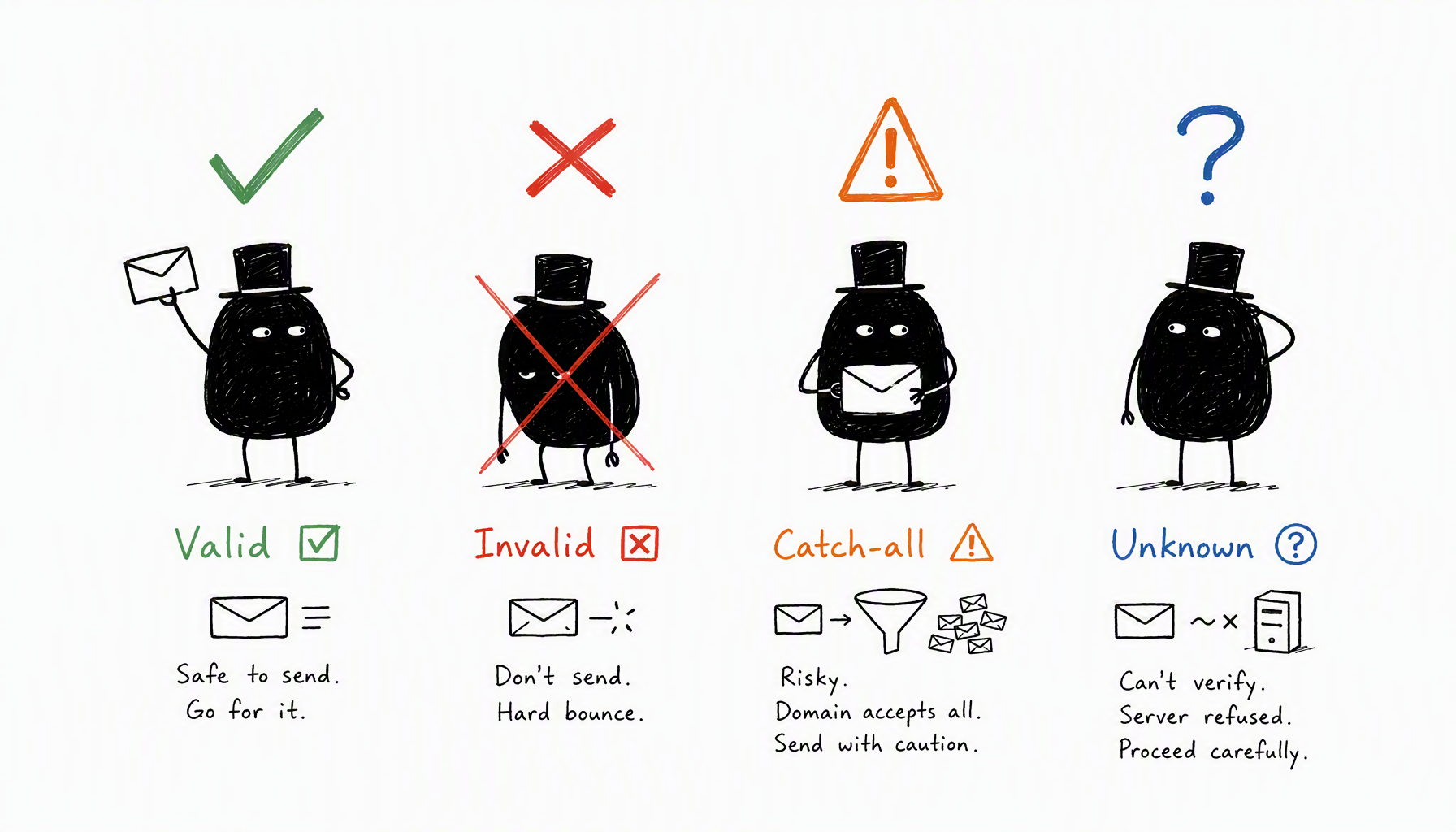
Not every result is binary. Here's what each status means:
- Valid ✅: Mailbox exists and accepts mail. Send with confidence.
- Invalid ❌: Mailbox doesn't exist. Remove from your list.
- Catch-all ⚠️: The domain accepts all emails, but this specific address might not be monitored. Send, but expect lower reply rates.
- Unknown ❓: Server refused to verify. Treat as medium risk.
The tricky one is catch-all. Technically valid, but 80% of catch-all addresses go unread. If you're working with a tight outreach budget, prioritize valid-only addresses.
What to Do After Verification
For agencies managing 200+ emails weekly:
- Export emails from CreatiVault Influencer Scout
- Upload CSV to your verification API
- Tag results in your CRM (Airtable, Notion, Sheets)
- Send only to "valid" status emails
- Queue catch-all addresses as backup
Cost: 200 emails × $0.008 = $1.60/week. Compare that to one lost partnership from a blacklisted domain.
The Takeaway
Verification isn't optional. A 10% bounce rate kills your sender reputation faster than bad copy kills reply rates. Run syntax checks instantly, verify MX records for free, and use SMTP verification for any list over 50 emails.
The math is simple: spend $0.008 per email now, or lose thousands in reputation damage later.
Ready to manage your full outreach pipeline — from finding emails to verification to tracking replies? Try CreatiVault's free Instagram email finder to start building your verified list.

 Sophie Klein