
Sep 4, 2026
How to Find Business Email Addresses (4 Methods)
Find business email addresses using LinkedIn, company websites, and email finder tools. Verify decision-maker emails before outreach to avoid bounces.
 Rena Sato 佐藤玲奈661 words3 min read
Use LinkedIn to find the person's name, match it to their company's email pattern (firstname@company.com), then verify with SMTP before sending. That's the fastest path to a decision-maker's inbox.
You need to reach 20 CMOs for partnership pitches. You have their company names and LinkedIn profiles, but no direct email. Generic info@ addresses go nowhere.
Here's how to find business email addresses that actually reach decision-makers.
Key Takeaways
• LinkedIn + email pattern matching finds 70% of business emails in under 2 minutes
• Company website team pages often list direct emails, but require manual extraction
• Always verify emails before outreach—a 10% bounce rate gets your domain blacklisted
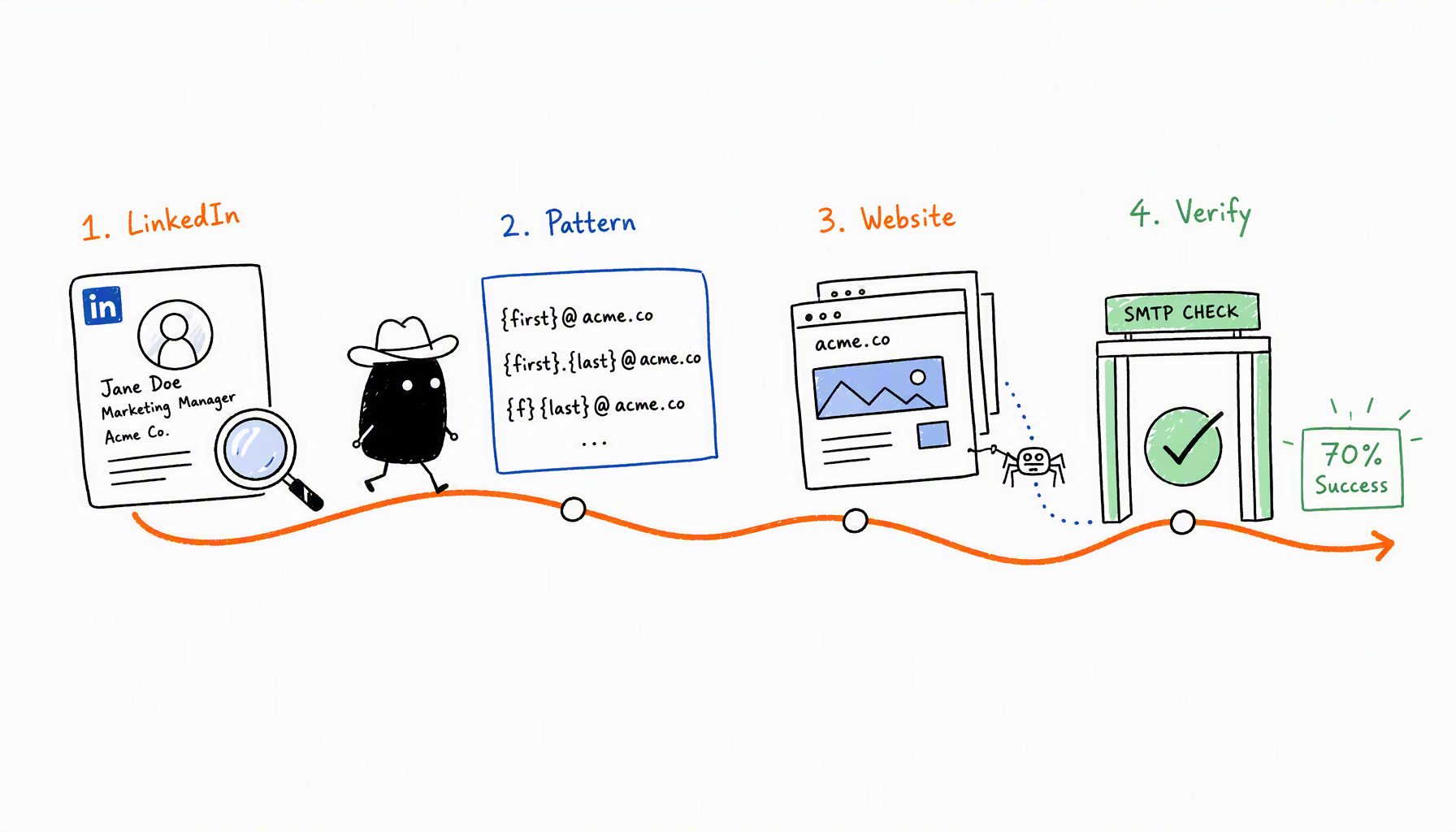
Method 1: LinkedIn + Email Pattern Matching
Most companies follow predictable email patterns. Once you know the format, you can construct any employee's address.
How it works:
- Find the person on LinkedIn (name + company)
- Identify the company domain (company.com)
- Test common patterns:
- firstname@company.com
- first.last@company.com
- firstnamelastinitial@company.com
Tools that auto-detect patterns: Hunter.io, RocketReach, Apollo.io. Upload a CSV with names and company domains, they return likely email addresses based on verified patterns from that company.
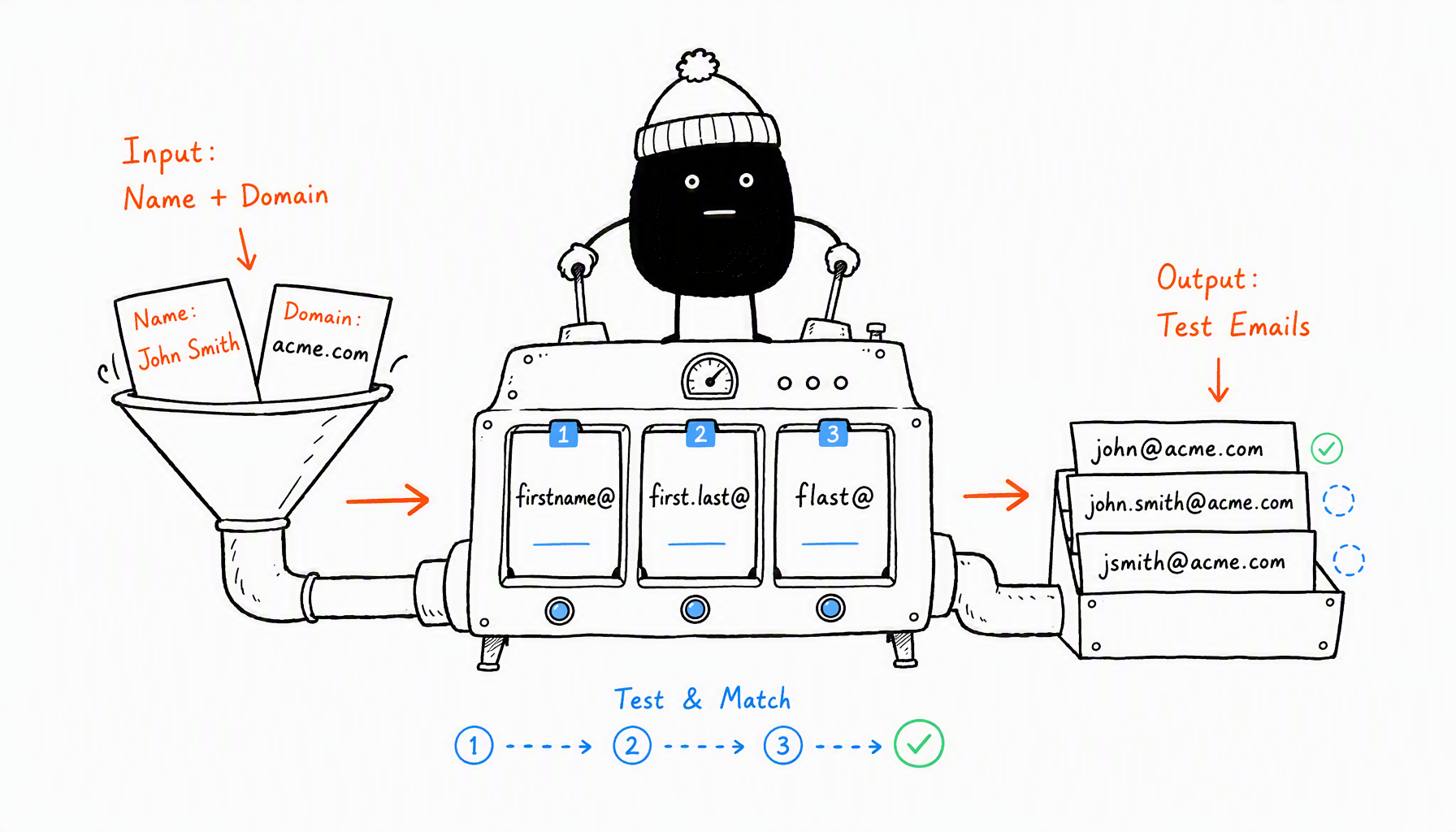
When Marcus needed to reach 30 SaaS CMOs in June, he pulled their names from LinkedIn, fed them into Hunter with company domains, and got 28 verified emails in 15 minutes. Two required manual lookup, but 93% hit rate saved him hours.
Method 2: Company Website Contact Pages
Many B2B companies list team emails on About Us, Team, or Leadership pages. These are gold—already public, already verified.
Where to look:
- About Us → Team section
- Press / Media pages (often list PR contacts with real emails)
- Blog author bios
- Case study credits
Chrome extension shortcut: Install Hunter's Chrome extension. Visit the company website, click the extension, and it scrapes all emails found on that domain. Sorts them by department (sales@, support@, specific names).
Red flag: Skip info@, sales@, and support@ unless you want to hit a shared inbox. Look for firstname@ or firstname.lastname@ patterns.
Method 3: Professional Email Finder Tools
When manual search is too slow, B2B email databases give you bulk access.
Tool comparison:
Tool | Database Size | Accuracy | Cost |
|---|---|---|---|
Apollo.io | 270M contacts | 90%+ | Free: 50/month, Paid: $49/month |
Hunter.io | 100M+ domains | 95%+ | Free: 25/month, Paid: $49/month |
RocketReach | 700M profiles | 85-90% | Paid only: $53/month |
Best for B2B: Apollo.io gives you the most free searches and includes job titles, so you can filter for "CMO" or "Head of Partnerships" before extracting emails.
Accuracy matters: Even 90% accuracy means 1 in 10 emails bounce. Always verify emails before sending to protect your sender reputation.
Method 4: Verify Before Sending
Finding an email is half the work. Verifying it's active is the other half.
Why verification matters: Decision-maker emails change frequently (promotions, departures, company mergers). A 6-month-old database email has a 15-20% bounce risk.
Quick verification:
- Use Hunter's email verifier (free tier: 25/month)
- Or run SMTP checks through ZeroBounce, NeverBounce
- Flag "catch-all" results—technically valid, but may not reach the person
Learn more about email verification before outreach to protect your sender reputation.
Red flags for fake/outdated emails:
- firstname123@company.com (numbered suffix = auto-generated)
- Generic roles (info@, contact@, team@)
- Emails from LinkedIn profiles not updated in 2+ years
Verification costs $0.01 per email. Compare that to a blacklisted domain that kills your entire outreach pipeline.
The Takeaway
Four steps to find business emails: pull names from LinkedIn, match to company email patterns, scrape company websites for listed contacts, and verify before sending. Tools like Apollo and Hunter automate the heavy lifting, but manual verification is non-negotiable.
A 10% bounce rate will get your domain flagged faster than a bad subject line tanks your open rate.
Need to scale outreach beyond B2B? CreatiVault's email finder works across Instagram, YouTube, and TikTok—same verification standards, broader reach. Try Instagram email finder or TikTok email finder free.
 Sophie Klein