Aug 11, 2026
Reverse Email Lookup: How to Find Out Who Owns an Email Address (Free Methods)
Google the address in quotes, check Gravatar, parse the domain, search LinkedIn, or run a free email finder. Reverse email lookup using public sources only.
 Daniel Brennan2,486 words10 min read
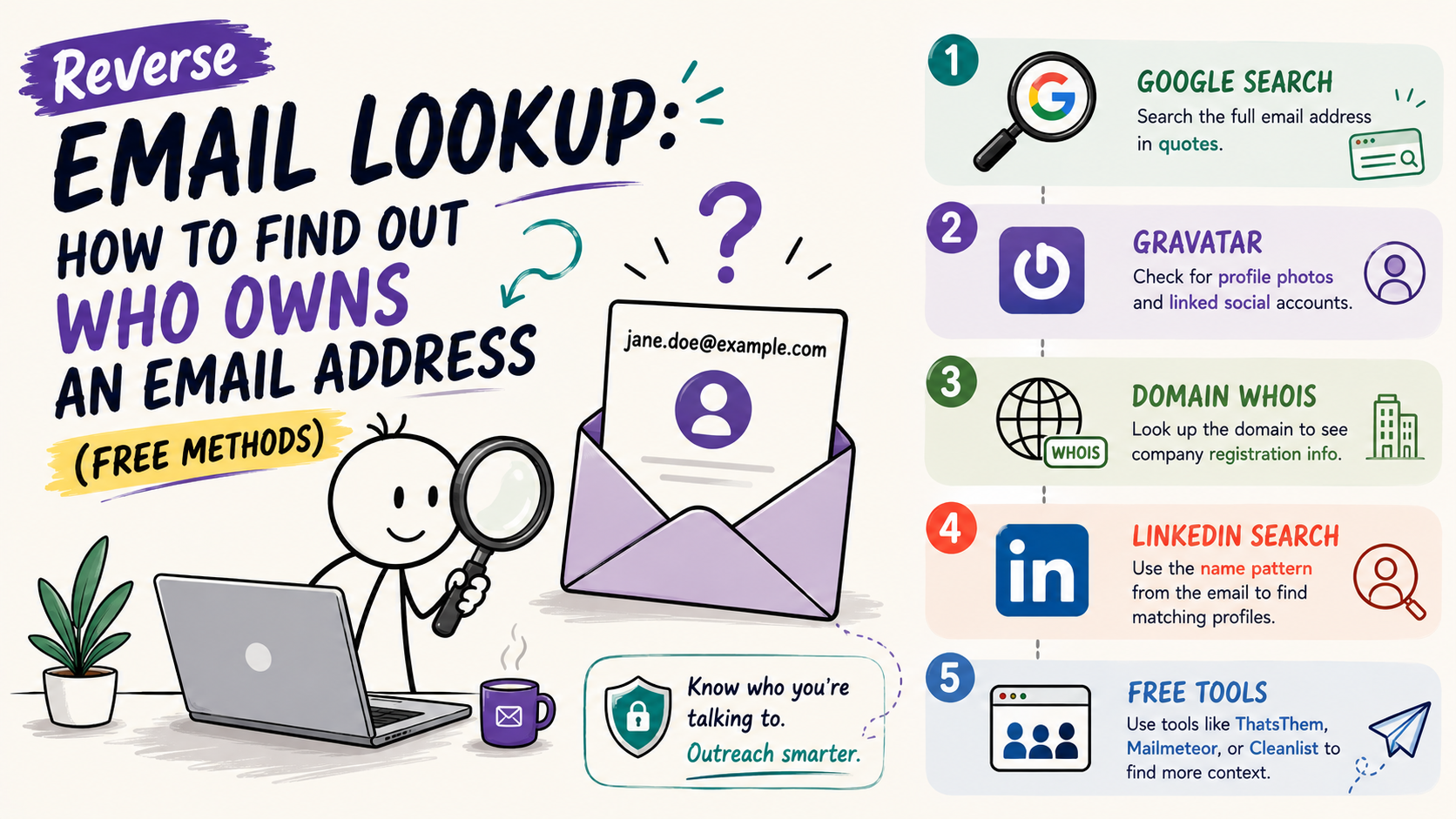
Work through it in this order:
- Start with Google, searching the full email address in quotes
- No results? Check Gravatar for a linked photo and social accounts
- Run a WHOIS lookup on the domain for company context
- Parse the name from the address and search LinkedIn
- Still nothing? Run it through a free email finder
You just got an inbound email from someone whose name doesn't match their address, or a creator replied to your outreach from a personal Gmail you've never seen. Before you respond, confirm who's on the other end: actual person, real company, or a throwaway account set up yesterday.
Here's how to run a reverse email lookup with free public sources, what each method can actually tell you, and where the privacy line sits under GDPR and CCPA.
Key Takeaways
• Google search in quotes surfaces the email if it's tied to public profiles, forums, or company pages
• Gravatar returns profile photos and linked social accounts for millions of addresses
• Domain WHOIS shows company registration info when the email uses a corporate domain
• LinkedIn search by name pattern (parsed from the email) connects addresses to profiles
• A free email finder aggregates these sources at scale
What Reverse Email Lookup Actually Finds
A reverse email lookup starts with an address and returns whatever public data that address is tied to: the owner's name, their company, social profiles, location, and sometimes a phone number.
What it can't do: Unlock private accounts, bypass platform privacy settings, or surface data the person never made public. If someone uses a brand-new Gmail with zero digital footprint, there's nothing to find.
Where the data comes from: Public social profiles (LinkedIn, Twitter, Facebook), domain registration records (WHOIS), Gravatar, company websites, forum posts, old blog comments, and anywhere else the person typed that email publicly.
Free Method 1: Google Search (Start Here)
The fastest reverse lookup is a Google search. Most people don't realize how much their email is scattered across the web—old forum accounts, company directories, conference attendee lists, Medium profiles, GitHub commits.
How to Do It
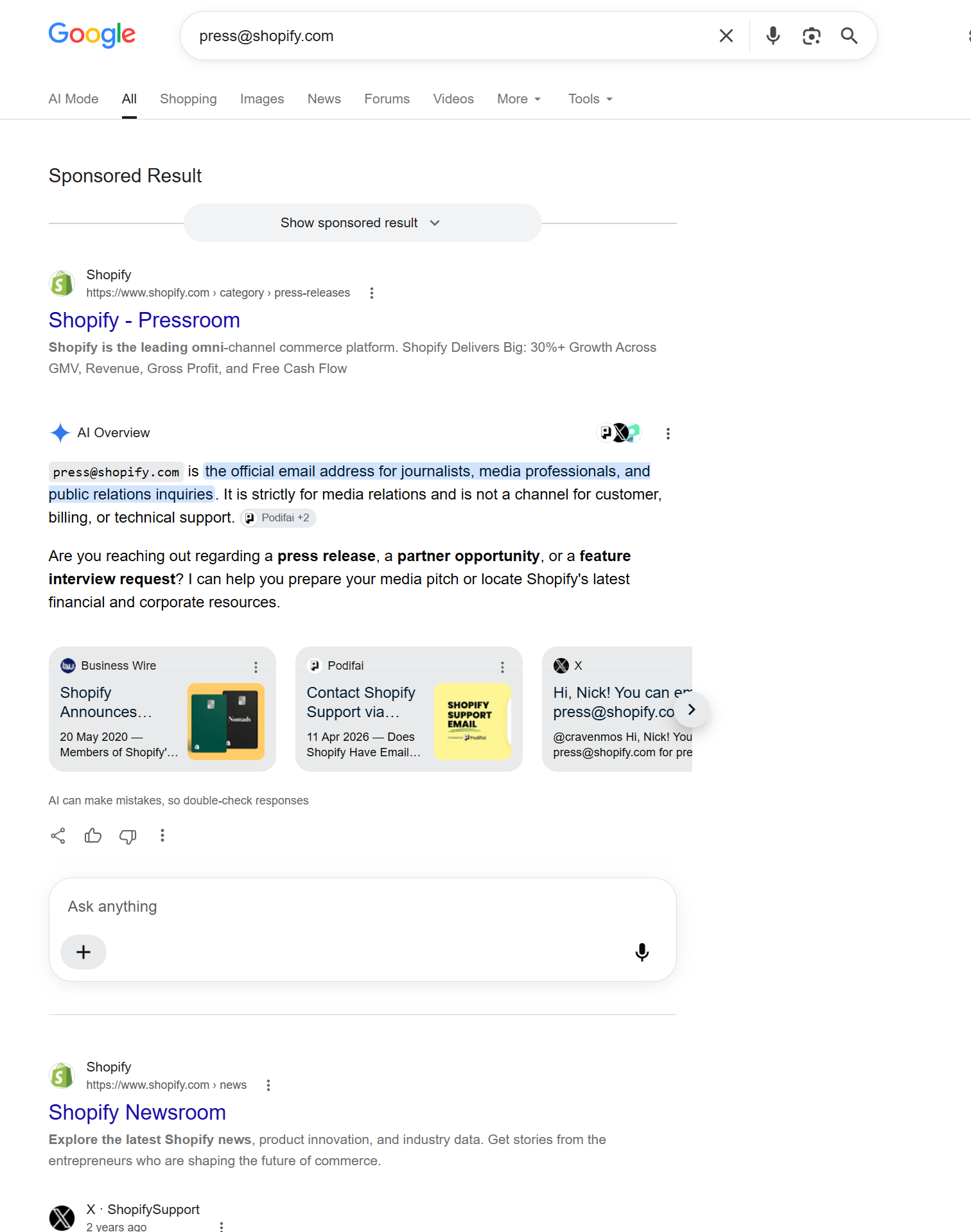
Search the full email address in quotes:
The quotes force an exact match. Without them, Google returns pages that mention "john" or "doe" or "company.com" separately, which buries the result you need.
What You'll Find
- Social profiles: LinkedIn, Twitter, Facebook, Instagram if the email is listed publicly
- Company pages: Team directories, about pages, press releases
- Forum posts: Reddit, Quora, niche community sites where the person used that email
- Old accounts: GitHub, Medium, Behance, portfolio sites
When It Works Best
Corporate emails (`[email protected]`) almost always return results—company sites, LinkedIn, press mentions. Personal Gmail addresses work when the person uses that email as their public contact across multiple platforms.
When It Fails
Brand-new addresses with no history, privacy-focused users who never list their email publicly, or people who only use their email for private communication.
Free Method 2: Gravatar Lookup
Gravatar is a service that ties profile photos to email addresses. Millions of people set up Gravatars without realizing those profiles are public and searchable.
How It Works
Go to `https://gravatar.com/` and search the email address, or construct the direct URL:
Most tools auto-convert the email to the hash for you, including the free influencer email finder.
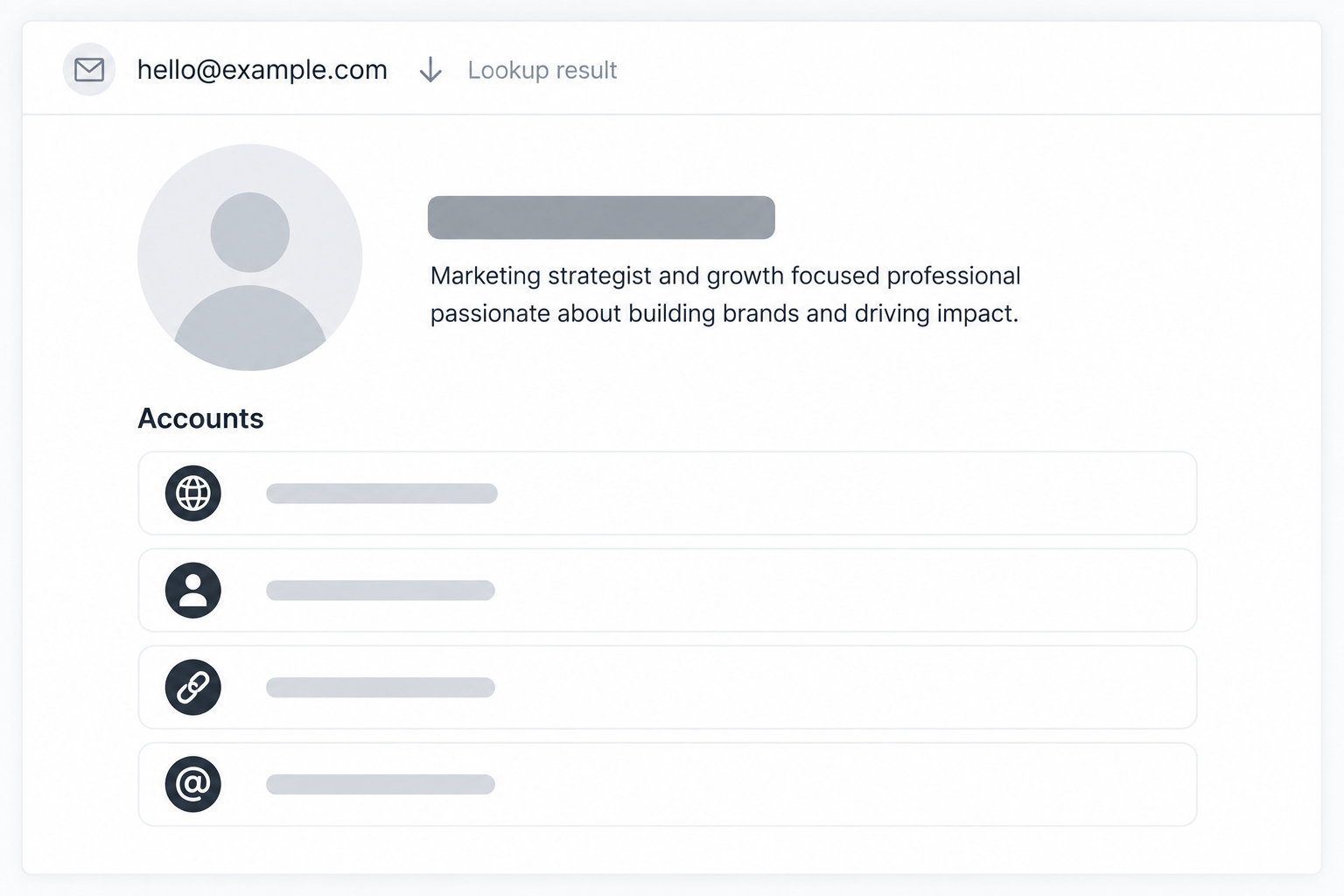
What You'll Find
- Profile photo (if they uploaded one)
- Display name
- Linked social accounts (Twitter, GitHub, LinkedIn, personal site)
- Location and bio (if filled out)
Real Example
An inbound partnership email from `[email protected]` returns a Gravatar with a real photo, the name "Alex Chen," and links to a personal site and LinkedIn. That's enough to verify it's a legitimate person, not a throwaway account.
Limitation
Only works if the person created a Gravatar. WordPress users and developers often have them. Most consumer Gmail users don't.
Free Method 3: Domain WHOIS Lookup
When an email uses a company or personal domain (`[email protected]`), the domain registration often lists the owner's contact info publicly.
How to Do It
Use a WHOIS lookup tool:
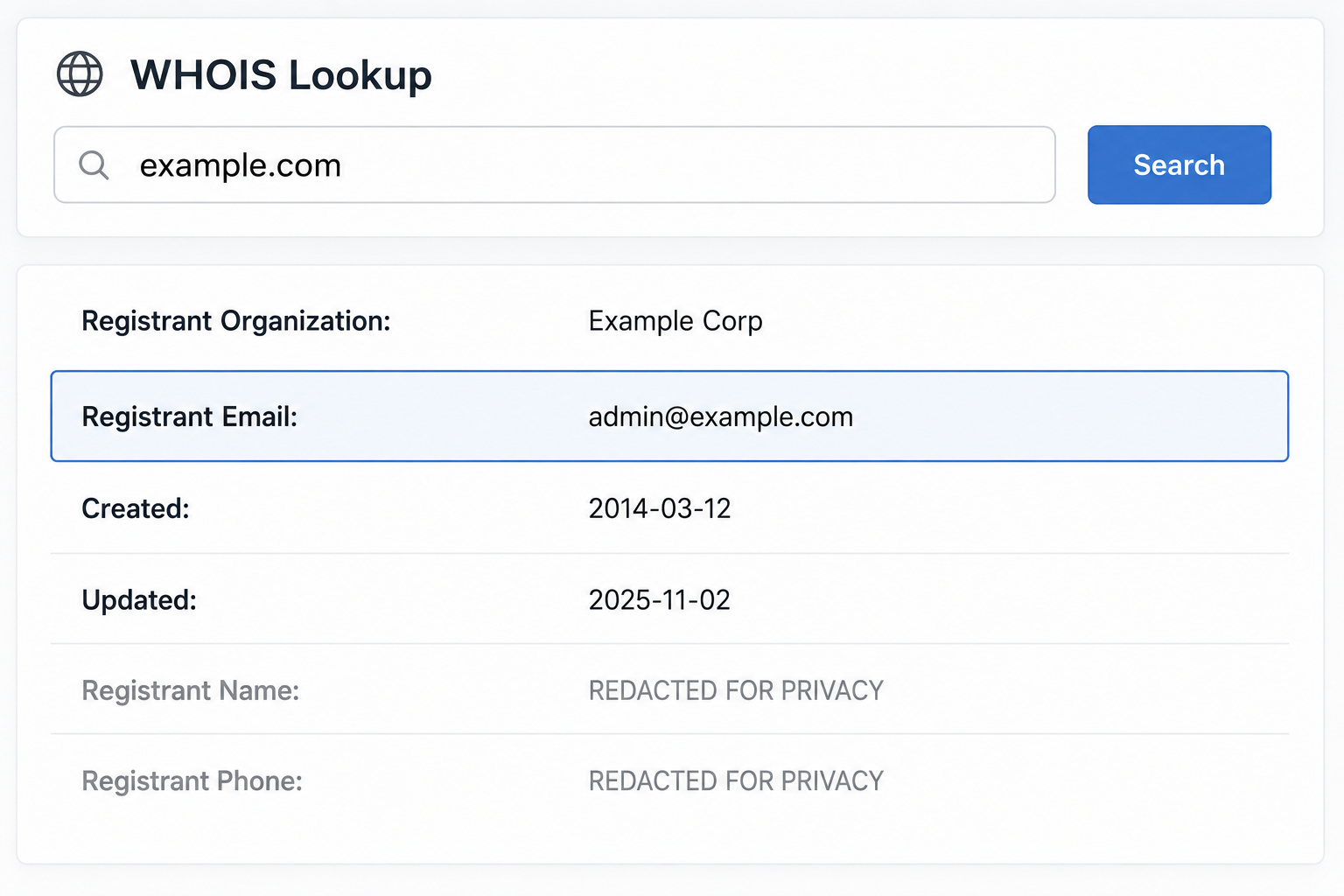
Enter the domain (not the full email—just `agency.com`) and check the registrant info.
What You'll Find
- Registrant name
- Registrant email (often different from the one you're looking up, but confirms the company)
- Company address and phone
- Domain creation date (tells you if it's a new domain or established)
When It's Useful
Corporate emails where you want to verify the company is real. A domain registered last week with privacy protection enabled is a red flag. A domain registered 10 years ago with a real business address is legitimate.
Privacy Note
Many domains now use privacy protection services that hide the registrant's personal info. That's normal and doesn't mean the email is fake—it just means the owner values privacy.
Free Method 4: LinkedIn Name Search
If the email follows a common pattern (`[email protected]`), you can parse the name and search LinkedIn for that person at that company.
How to Parse the Email
Common corporate email patterns:
- `[email protected]` → Jane Doe at Company
- `[email protected]` → Jane Doe at Company
- `[email protected]` → John Smith at Company
- `[email protected]` → James Brown at Company
LinkedIn Search Strategy
- Parse the likely name from the email
- Search LinkedIn for `"Jane Doe" company.com` or `"Jane Doe" Company Name`
- Check the profile's listed email or contact info
When It Works
B2B emails at mid-to-large companies; finding creator contact details works similarly. Less effective for small businesses or international markets where LinkedIn adoption is lower.
What You Confirm
The person exists, works at that company, and holds the role they claim. If the email says "Head of Partnerships" but LinkedIn shows "Junior Marketing Associate," that's a mismatch worth noting.
Free Method 5: Reverse Email Lookup Tools
When manual checks fail, reverse email tools aggregate all the sources above (Google, Gravatar, WHOIS, social platforms) and return the result in one search.
The Tool We'd Point You To
If the address belongs to a creator, the fastest path is the free influencer email finder. Paste the handle or the address, and it returns whatever public contact and profile data is tied to it. No signup, no card, no daily cap.
Checking a whole list instead of one address? Influencer Scout filters creators, unlocks emails for the entire shortlist at once, and tracks replies in the same screen. 14-day free trial, no credit card.
How It Works
Nothing gets hacked. It scans the same public sources you'd check by hand — social platforms, domain records, Gravatar, public directories — in seconds instead of 20 minutes of tab-switching.
When to Use Them
- You're vetting dozens of inbound emails and don't have time to Google each one
- Manual checks returned nothing but you suspect the address is tied to something public you missed
- You need a quick yes/no on "is this person real" before responding
Creator vs Corporate
Creator addresses — Gmail, personal domains, agency inboxes — are what the free finder is tuned for. A corporate address tied to LinkedIn is usually faster to resolve with the manual LinkedIn search above.
What You Can and Can't Do with the Results
Legitimate Uses
- Verify inbound emails: Confirm a partnership inquiry is from a real person at a real company before scheduling a call
- Vet influencer outreach: Check that a creator replying from a Gmail matches the TikTok account they claim
- Reconnect with someone: Find a LinkedIn profile for an old colleague when you only have their email
- Fraud detection: Spot throwaway accounts used for phishing or fake partnership scams
What's Not Allowed
- Adding to marketing lists without consent: Even if an email is public, GDPR and CAN-SPAM require opt-in before adding someone to a newsletter
- Aggressive scraping at scale: Extracting thousands of emails from LinkedIn or social platforms violates their terms and often local privacy law
- Using "personal" data for business outreach: If an email is labeled "personal" rather than "business," using it for cold outreach may violate GDPR
The GDPR/CCPA Line
In the EU and UK, GDPR applies even to business emails when you're storing and processing them as a database. Key rules:
- Publicly available ≠ free-for-all: Just because an email is on LinkedIn doesn't mean you can scrape 10,000 of them and blast a promo
- Business-to-business emails are usually fine: Reaching out to `[email protected]` with a business proposal is typically compliant
- Let people opt out: Every outreach email needs an unsubscribe path
- Don't store forever: If someone doesn't respond, delete their email after a reasonable period
In the US, CCPA applies similarly—consumers have the right to know what data you've collected and request deletion.
Practical Guideline
If the email was made public for business purposes (on a company site, in a LinkedIn profile set to public), using it to send a single, relevant business message is usually fine. Building a database from scraped emails and sending bulk campaigns without consent crosses the line.
When Reverse Lookup Returns Nothing
Sometimes an email has zero public footprint. That happens when:
- Brand-new account: Created yesterday with no linked profiles or posts yet
- Privacy-focused user: Never uses the email publicly, keeps all social profiles private
- Alias or forwarding address: The email forwards to a real account but isn't tied to any profile itself
- Disposable email service: Temp email from services like Guerrilla Mail or 10 Minute Mail
What to Do
If you're vetting an inbound email and the lookup returns nothing:
- Check the email's domain registration (is the domain real and established?)
- Reply asking for more context—"Can you share your LinkedIn or company site?"
- Trust your gut—a partnership offer from a zero-footprint email is often spam
If you're trying to reconnect with someone and can't find them, they may have deliberately kept that email private. Respect that boundary.
Batch Reverse Lookup (Agencies & Brands)
When you need to vet 50+ emails—inbound applications, creator shortlists, partnership inquiries—manual lookups don't scale.
Workflow
- Export the email list: CSV with one email per row
- Upload to a batch tool: run the list through a bulk lookup instead of one search at a time
- Download enriched results: Returns name, company, LinkedIn, and validity status for each email
- Filter and segment: Mark valid addresses, flag suspicious ones, segment by role or company size
Doing It at Creator Scale
For creator lists specifically, Influencer Scout is built for this shape of work: upload or filter the shortlist, unlock emails for everyone on it in one action, then send and track from the same place. 14-day free trial, no credit card. For pure deliverability checks on a B2B list, a dedicated verifier like NeverBounce still does the job.
Use Case: Creator Vetting
You shortlisted 100 TikTok creators for a campaign. Half replied with personal Gmails. Run a batch reverse lookup to confirm each Gmail ties to the correct TikTok account.
- Confirm each Gmail ties to the correct TikTok account
- Spot fake replies (someone using another creator's name)
- Pull LinkedIn profiles for creators who list them publicly
Flag any email that returns zero results for manual follow-up.
Common Reverse Lookup Scenarios
Scenario 1: Inbound Partnership Email
You get an email from `[email protected]` claiming to represent a brand interested in collaboration.
Reverse lookup steps:
- Google `"[email protected]"` → No results
- WHOIS lookup on `agency.com` → Registered last month, privacy-protected
- LinkedIn search for "Maria Silva agency.com" → No profile found
Verdict: Likely fake. New domain, no Google footprint, no LinkedIn. Ask for a company site and past work before responding.
Scenario 2: Creator Outreach Reply
A beauty creator you contacted replies from `[email protected]`, but you reached out via TikTok where their bio lists a different email.
Reverse lookup steps:
- Google `"[email protected]"` → Returns an old blog and a Gravatar
- Gravatar → Profile photo matches TikTok, links to Instagram and the original email
- Instagram bio → Lists `[email protected]` as the business contact
Verdict: Legit. The Gmail is an old personal address they still check. The Instagram confirms the real business email.
Scenario 3: Cold Email from a "Decision Maker"
Someone claiming to be the VP of Marketing at a major brand emails from a Gmail, not a company domain.
Reverse lookup steps:
- Google the Gmail → Returns a LinkedIn profile... for a junior marketer at a different company
- LinkedIn cross-check → The profile's actual title is "Marketing Coordinator"
Verdict: Misrepresented role, possibly a junior employee trying to sound senior. Proceed with caution or ask to connect on LinkedIn first.
Which Method to Use When
Method | Best For | Cost | What It Returns |
|---|---|---|---|
Google quoted search | Any address, first check | Free | Old posts, forums, listings |
Gravatar | Creators and developers | Free | Photo, name, linked profiles |
WHOIS | Custom-domain addresses | Free | Registrant name, org, dates |
LinkedIn name search | Work addresses | Free | Employer, role, tenure |
Creator addresses | Free | Public contact and profile data | |
Whole shortlists at once | 14-day trial, no card | Bulk unlock, outreach, tracking |
General rule: start with the quoted Google search. If it's a creator, go straight to the free finder. If it's a list rather than a single name, that's Influencer Scout's job.
Privacy and Ethics
What's Ethical
- Verifying that an inbound email is from a real person before engaging
- Confirming a creator's identity before sending payment
- Reconnecting with someone when you've lost touch and only have their email
- Fraud prevention and security vetting
What's Not
- Scraping thousands of emails to build a cold outreach list
- Using someone's personal email for marketing when they only shared it for a one-time transaction
- Ignoring unsubscribe requests because "the email is public anyway"
- Selling or sharing email-to-profile mappings you looked up
The Rule
If you'd feel weird explaining to the person exactly how you got their info and what you're using it for, don't do it.
The Takeaway
A reverse email lookup is a five-minute check: start with Google, fall back to a free email finder when manual searches come up empty. It tells you whether an address ties to a real person, a legitimate company, or a throwaway account set up to spam you.
The data comes from public sources: profiles, domains, Gravatar, company sites. No tool hacks anything. They aggregate what's already visible, faster than you can tab-switch.
Use it to vet inbound emails, confirm creator identities, and spot fraud. Don't use it to scrape contact lists or bypass someone's deliberate privacy choices.
Next steps:
- Start with a Google search in quotes: `"email@example.com"`
- Check Gravatar and domain WHOIS for corporate emails
- Parse the name and search LinkedIn
- Run it through the free influencer email finder when manual checks fail
- Respect GDPR/CCPA. Verify identities, don't build spam lists
Checking one address? The free tool covers it, no account needed. Verifying a whole creator list? Start free with CreatiVault — Influencer Scout adds bulk email unlock, outreach, and pipeline tracking on a 14-day trial with no credit card.
 Sophie Klein