Aug 11, 2026
How to Find a Creator's Email on TikTok, YouTube, and Instagram
TikTok bio and YouTube About page show emails publicly. When hidden, check their other platforms, link-in-bio tools, or use an email finder. Free methods inside.
 Daniel Brennan1,715 words7 min read
Check the TikTok bio, YouTube About page, or Instagram bio first — most creators who want brand deals put their email there. When it's hidden, try their other social profiles, link-in-bio pages (Linktree, Beacons), or an email finder tool.
Most brand outreach dies at the "where do I even contact them" step. A creator looks perfect — right audience, solid engagement, on-brand content — but there's no visible email. You click every tab, check every link, and still nothing.
Here's the order that actually works, across the three platforms where DTC brands run influencer campaigns. No guessing, no scraping. Just the public info creators already shared.
Key Takeaways
• TikTok shows business emails in the bio or profile settings when creators enable it
• YouTube's About page lists contact emails for channels enrolled in the Partner Program
• Instagram business accounts surface emails in "Contact Options" or the bio
• Most creators use link-in-bio tools (Linktree, Beacons) that aggregate all contact methods
• When manual checks fail, free email finder tools pull from the same public sources at scale
Where Creators Actually Put Their Email
TikTok
TikTok doesn't have a dedicated "Business Contact" field like YouTube. Creators who want brand deals drop their email in one of two spots:
- Bio text: Most common. Look for `📧 [email protected]` or `Business: [email]` in the profile description.
- Link-in-bio: The URL in their profile often points to Linktree, Beacons, or a similar hub that lists email, rates, and other platforms.
What you won't find: TikTok doesn't auto-display emails pulled from account settings. If it's not in the bio or link-in-bio, the creator didn't make it public.
Pro tip: Check their Instagram handle if it's in the TikTok bio. Creators often centralize contact info on one platform.
YouTube
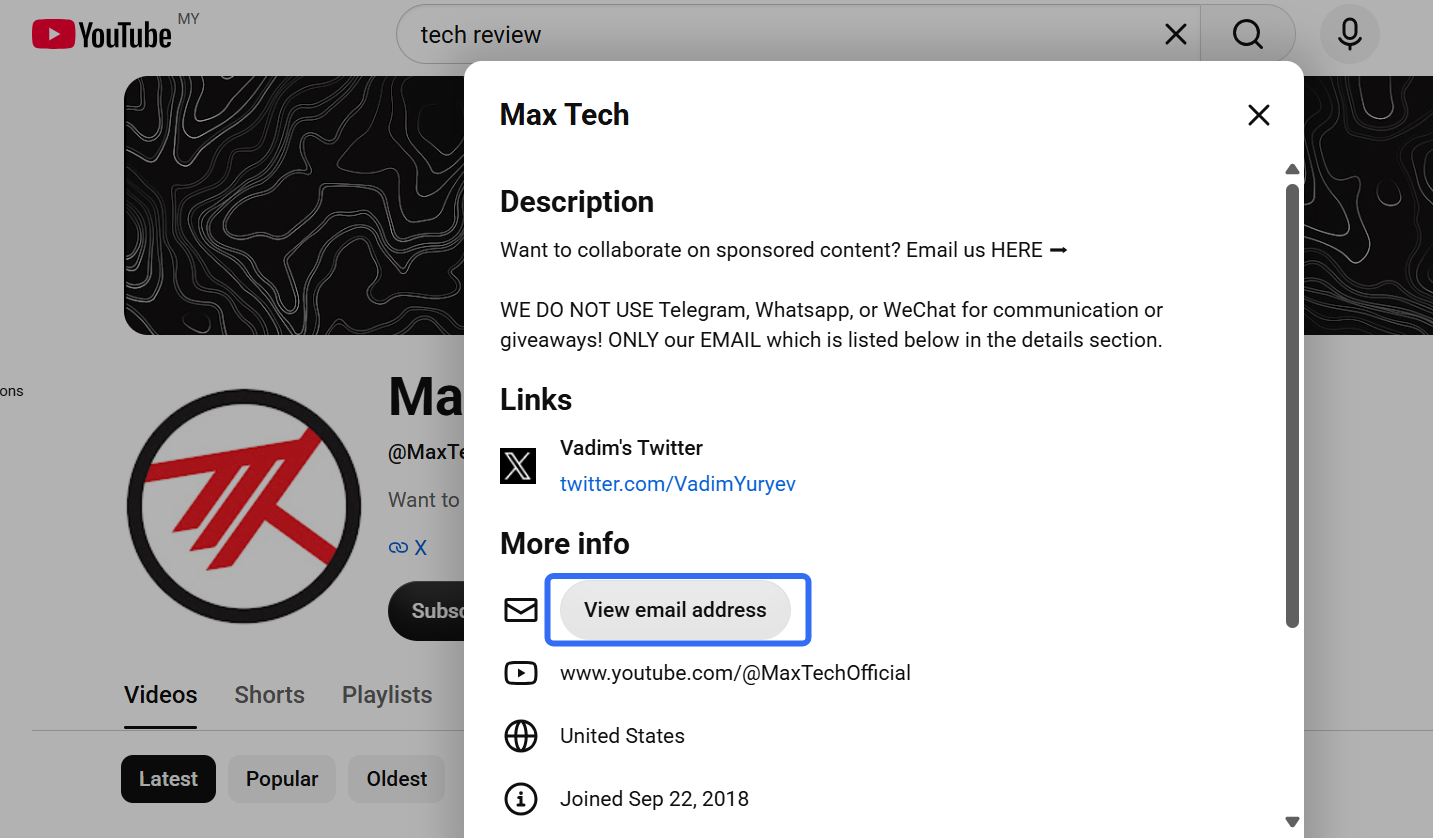
YouTube makes this the easiest of the three platforms — if the creator enrolled in the YouTube Partner Program and chose to display contact info.
Where to look:
- Go to the channel page
- Click the About tab
- Look for "View email address" under the Details section
When you click it, YouTube shows the business email the creator registered. It's not hidden behind a paywall or form — just click and copy.
When it's not there: The creator either hasn't joined the Partner Program (unlikely for anyone with a real audience) or opted out of showing their email. Move to their other platforms.
Instagram business accounts can surface emails in two ways:
- Contact button: Business profiles show "Email" / "Call" / "Directions" buttons under the bio. Tap "Email" and Instagram opens your mail app with their address pre-filled.
- Bio text: Same as TikTok. Creators often write `📩 [email]` or `Collabs: [email]` directly in the bio.
What to know: Personal accounts don't show the contact button. If you only see "Message" and no email option, check their bio text or move to their link-in-bio.
The Cross-Platform Check (Manual Method)
No email on their main platform? It's somewhere else in their ecosystem. Check in this order:
Step 1: Check Their Link-in-Bio
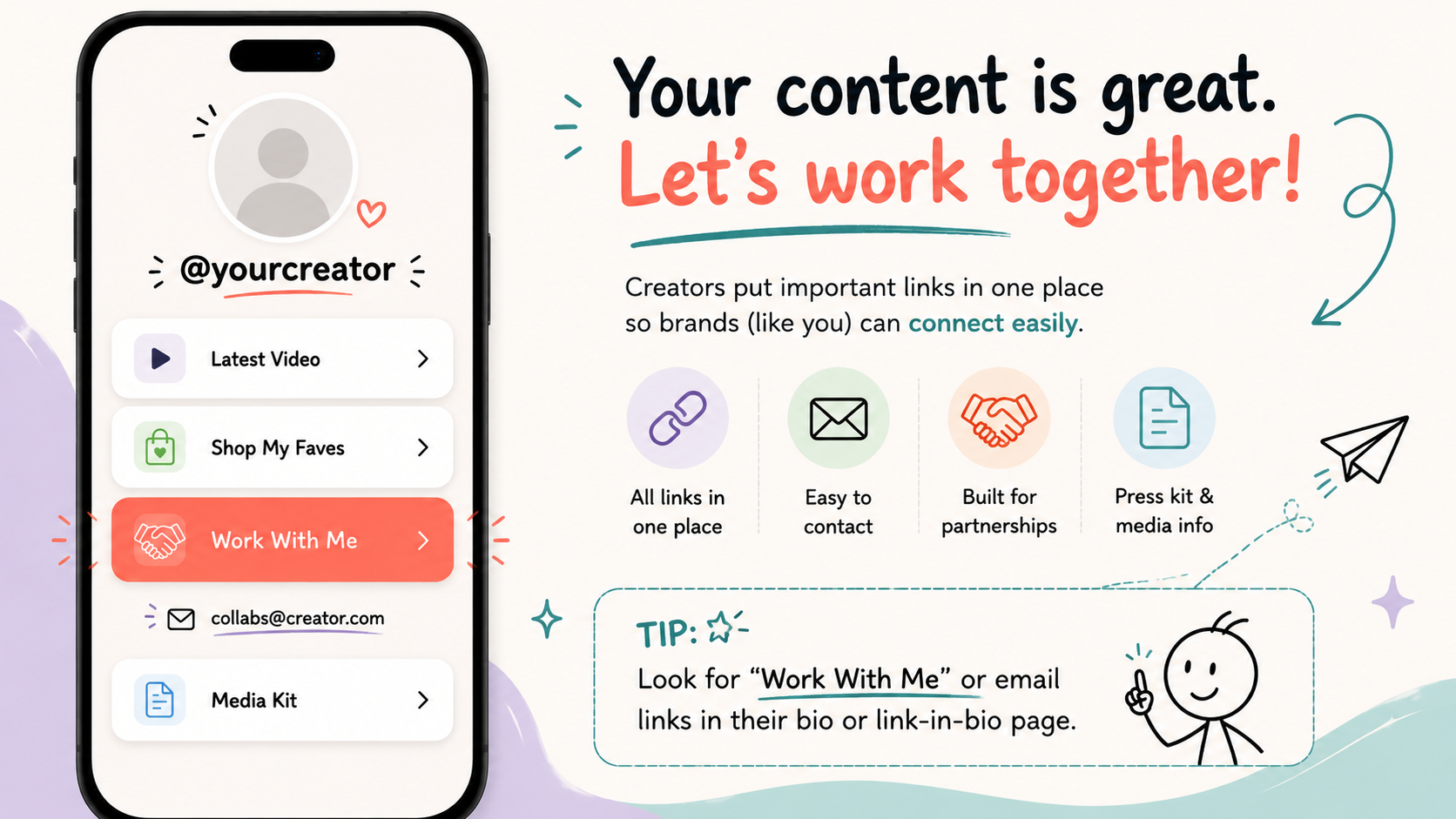
Most creators use Linktree, Beacons, Bio.fm, or a custom landing page. These tools exist to centralize contact info, rates, and portfolio links. Look for:
- Email listed directly on the page
- "Work With Me" or "Brand Partnerships" section
- Contact form (less ideal, but better than nothing)
Step 2: Check Their Other Platforms
If their TikTok bio mentions Instagram, go there. If their YouTube links to Twitter/X, check that bio. Creators rarely duplicate contact setup across every platform — they pick one "main" profile and point everywhere else to it.
Pattern to watch: YouTube creators often centralize on Instagram. TikTok creators often keep their full media kit on a link-in-bio page.
Step 3: Check the Video Descriptions (YouTube)
Some creators drop their email in every video description, especially if they're actively seeking sponsorships. Scroll to a recent upload, expand the description, and Ctrl+F for `@` or `business`.
Step 4: Google the Creator Name + "Email"
Obvious, but it works. If they've ever mentioned their contact publicly — in a tweet, a Reddit AMA, a podcast interview — Google surfaces it.
When Manual Checks Fail: Email Finder Tools
If a creator has no public email after checking every platform and link, one of three things is true:
- They're not taking brand deals right now
- They're managed by an agency (contact the agency instead)
- Their email is indexed somewhere public but you didn't find it
Email finder tools solve #3. They scan the same sources you'd check manually — bios, Gravatar, domain WHOIS, social profiles — but do it across millions of accounts in seconds.
So which one should you actually use?
If you're checking one creator, start with the free influencer email finder. Paste the handle, get whatever public contact info exists. No account, no card, no limit on how many times you come back to it. For most people reading this, that's the whole answer.
The moment you're working from a list instead of a single name, the free tool stops being the right shape. That's what Influencer Scout is for — filter creators by platform, niche, and audience size, unlock emails for the whole shortlist at once, then send and track from the same screen. It comes with a 14-day free trial, and you don't need a credit card to start it.
How these tools work: they pull from publicly available data. The bio text you'd read yourself, the link-in-bio page you'd click yourself, the Gravatar tied to the account. Nothing gets "hacked," no private profile gets unlocked. The only thing being automated is the tab-switching.
When to reach for one: you're vetting 50+ creators and don't have the hours to click through every profile. Or you checked everywhere manually and came up empty, and you want to know whether there's an email sitting in a secondary account or an old blog post you never thought to look at.
What Not to Do
Don't Scrape Aggressively
Avoid tools that promise to "extract 10,000 emails in one click" from TikTok or Instagram. Platforms block that behavior, and in the EU/UK, scraping business contact data without consent still falls under GDPR.
Stick to tools that surface data creators already made public for business purposes. If an email isn't meant to be found, it isn't meant to be found.
Don't Use DMs as a Substitute for Email
Sliding into a creator's DMs with a pitch wastes time on both sides. Creators expect brand deals via email — that's where rates, contracts, and calendars live. DMs are for fans, not partnerships.
Exception: Nano-creators (under 10k followers) who haven't set up business contact yet. Even then, ask in the DM for their email rather than pitching cold.
Don't Guess Email Formats
You found the creator's name and they have a personal domain, so you try `[email protected]`, `[email protected]`, `[email protected]` — and all three bounce.
Email guessing is slower and less reliable than just checking their link-in-bio or running one search in an email finder tool. Skip it.
The Batch Workflow (Agencies & Brands Running 20+ Outreaches)
Contacting dozens of creators for one campaign? The platform-by-platform check doesn't scale. The agency workflow:
Step 1: Build the Shortlist
Pull creators that match your category, follower range, and engagement rate. Influencer Scout filters by platform, niche, and audience size.
Step 2: Unlock Emails at Scale
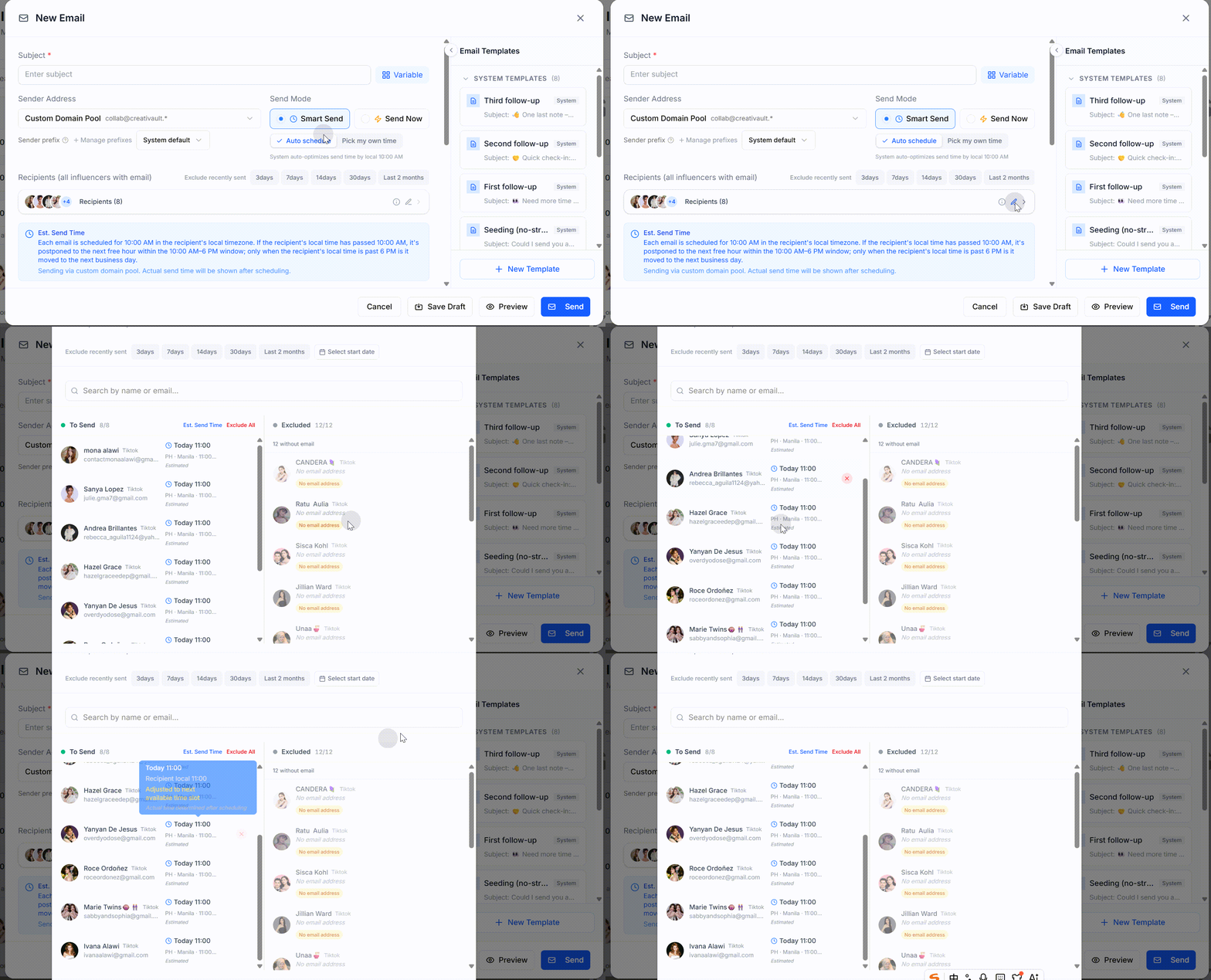
Instead of clicking through 50 TikTok profiles one by one, unlock the whole list at once.
This collapses the slowest part of the workflow. Select the creators on your shortlist, unlock their emails in one action, and the addresses land next to each profile. No tab-switching, no copy-paste into a spreadsheet. Start a 14-day free trial of Influencer Scout — no credit card — and the list is ready to send from the same screen.
Step 3: Verify and Segment
Not every returned email is current. Run the list through a verifier (Hunter.io, NeverBounce) to filter out dead addresses before you send.
Then segment by tier — nano, micro, mid-tier — and write to each differently. A templated blast to 100 creators gets ignored. A targeted pitch to 20 gets replies.
Step 4: Track the Pipeline
Track who you contacted, who replied, who's negotiating, and who signed. Influencer Scout handles this in one place — from email finder to deal tracking.
When the Email Is Managed by an Agency
If a creator's bio says "Managed by [Agency Name]" or links to an agency site, that's your contact path. Email the agency directly with:
- Campaign brief (timeline, deliverables, budget range)
- Why this specific creator fits
- Your brand and past influencer work
Agencies field dozens of inbound requests. The more specific you are upfront, the faster they move.
Compliance Note
Brand outreach to creators falls under business-to-business communication in most regions, but GDPR and CCPA still apply when you're storing and processing that contact data.
What that means:
- Don't add creators to a marketing newsletter without opt-in
- Let them unsubscribe from campaign emails
- Store emails securely if you're keeping a creator database
Most email finder tools only surface data creators made public for business purposes. That's usually fine. Just don't scrape, guess, or use data labeled "personal" rather than "business."
The Takeaway
Finding a creator's email is a five-minute task when you check the right places in order: bio, link-in-bio, other platforms, video descriptions. When manual checks fail, email finder tools do the cross-platform lookup at scale.
The bottleneck isn't finding the email. It's what you send once you have it. Creators get dozens of pitches a week. The ones that work are specific, respectful of their audience, and show you actually watched their content.
Next steps:
- Check TikTok bio, YouTube About, Instagram contact button
- If hidden, check their link-in-bio page and cross-platform profiles
- For batch outreach, use an email finder tool to surface public contacts at scale
- Verify emails before sending and track the pipeline from first contact to signed deal
Want to find and contact creators across TikTok, YouTube, and Instagram in one workflow? Start free with CreatiVault — the influencer email finder is free to use, and Influencer Scout adds bulk unlock, outreach templates, and pipeline tracking on a 14-day trial with no credit card required.
 Sophie Klein